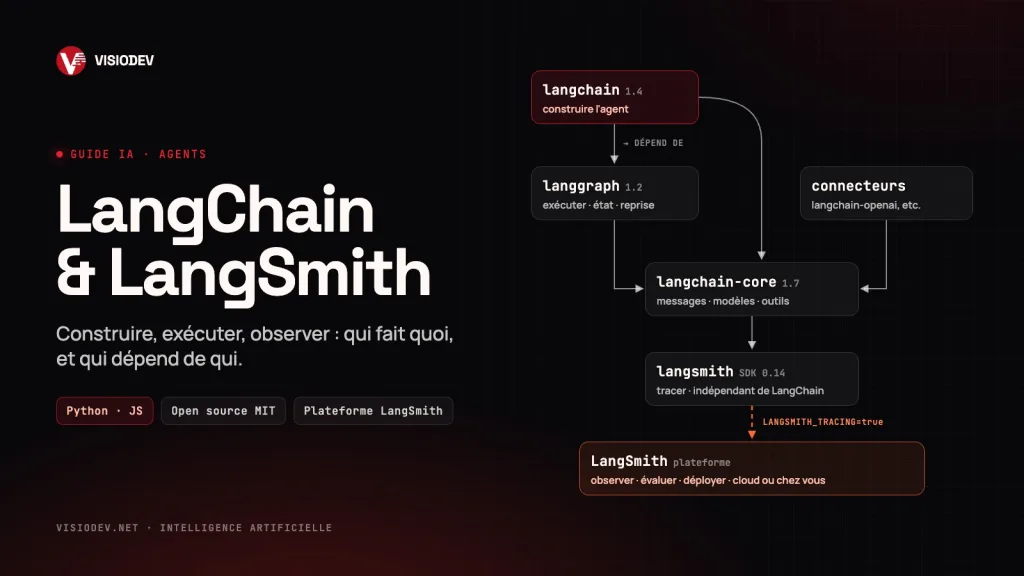
The essentials in 30 seconds
- LangChain is for building AI applications and agents: connecting a language model to your data and your tools. It is open source and free.
- LangGraph is the engine that LangChain agents run on. It lets them resume after a failure, wait for human approval and remember.
- LangSmith is for steering: seeing what the agent does, measuring the quality of its answers, tracking costs and deploying it. It is a commercial platform with a free tier.
- How the two connect: installing LangChain automatically installs the LangSmith SDK, and two environment variables are enough to trace everything. But LangSmith also works without LangChain.
The problem these tools solve
A language model on its own answers a question. A useful business application has to do much more: read your documents, query your database or ERP, keep track of a conversation, stop to ask a manager for approval, and prove that its answers are right.
Two difficulties follow. The first is building: putting the model, the tools and the data together without rewriting everything each time you change provider. The second is staying in control: understanding why the agent got it wrong last Tuesday, checking that a change broke nothing, knowing what each conversation costs.
A picture helps. If your agent were an aircraft, LangChain would be the workshop and the standard parts used to build it, LangGraph the flight plan and the autopilot, and LangSmith the black box, the control tower and the flight simulator rolled into one.
LangChain: the workshop for building your agents
In one sentence: LangChain provides ready-made building blocks to plug an AI model into your tools and your data, without being tied to a single provider.
Created in October 2022 by Harrison Chase, the project became a company in 2023. Version 1.0 came out on October 22, 2025, and the current Python line is 1.4. The framework exists in Python and JavaScript/TypeScript, under the MIT license.
What it brings in practice:
- One interface for every model. OpenAI, Anthropic, Google, Mistral, or a local model through Ollama: switching provider means changing one line.
- Tools. A plain, documented Python function becomes an action the agent can trigger: checking stock, opening a ticket, looking up a customer. MCP servers are supported too.
- A ready-to-use agent. The
create_agentfunction runs the whole loop: the agent reasons, calls a tool, reads the result, then answers. - Middleware. These are checkpoints around that loop: human approval before a sensitive action, summarizing long conversations, masking personal data, capping the number of calls, a fallback model when a provider fails.
- Data connectors for RAG, that is, answering from your own documents: file loading, chunking, vector stores.
Here is a complete agent with one business tool. Install it with pip install -U langchain "langchain[openai]":
from langchain.agents import create_agent

def available_stock(reference: str) -> str:
    """Return the available stock for a product reference."""
    return f"{reference}: 120 units in stock"  # in real life: query your database

agent = create_agent(
    model="openai:gpt-5.5",
    tools=[available_stock],
    system_prompt="You are the company's logistics assistant.",
)

result = agent.invoke(
    {"messages": [{"role": "user", "content": "How many PAR-500 do we have left?"}]}
)
print(result["messages"][-1].content)
The model reads the question, works out that it must call available_stock with the reference PAR-500, then writes the answer. To move to another provider, you only change the model= line.
For more autonomous agents (planning, sub-agents, a file workspace), LangChain also offers Deep Agents, a more complete harness built on create_agent.
LangGraph: the engine under the hood
In one sentence: LangGraph is what lets an agent carry out long, reliable work, pick up where it left off and wait for a human decision.
LangGraph describes an application as a graph: nodes (the steps), edges (the transitions, possibly conditional) and a shared state passed from one to the next. This model gives guarantees that a simple loop does not:
- Durable execution. The state is saved at every step (checkpoints). After a crash or a restart, the agent resumes from the last saved point.
- Human in the loop. The graph can pause, for example before confirming an order, wait hours for an answer, then carry on.
- Memory. Short-term within a conversation, long-term across sessions.
- Mixing deterministic steps and AI. Some steps follow fixed rules (checks, calculations, sending), others let the model decide.
- Streaming. Intermediate results show up as they are produced.
Since version 1.0, every agent built with create_agent is a LangGraph graph. The practical rule is simple: start with create_agent, and drop down to LangGraph when your process requires steps, branches or approvals that you want to control precisely.
LangSmith: the control tower
In one sentence: LangSmith shows you what your agent actually does, measures the quality of its answers and runs it in production.
Generally available since February 2024 and made by the same company, LangSmith is a commercial platform. Its software development kit (SDK), on the other hand, is open source. The platform now presents itself as framework-agnostic: it traces a LangChain agent just as well as a direct call to the OpenAI API or an application built with another tool.
Its main modules:
- Observability. Every run becomes a trace: model calls, tools triggered, documents retrieved, duration, token count, cost. Dashboards and alerts track errors, latency and spending.
- Evaluation. You build a set of reference questions, then score the answers with evaluators: a "judge" model, code, or domain experts through annotation queues. Each change to the prompt or the model is compared with the previous one before it goes to production. The same evaluators can score live traffic.
- Versioned prompts. A space to test prompts and keep their history.
- Deployment. LangSmith Deployment, formerly LangGraph Platform, runs your agents in production: recovery after failures, long-running tasks, human approvals, scaling. It is available in the cloud, hybrid or on your own infrastructure.
- New in 2026: Engine, which groups production failures and proposes fixes; Fleet, for building agents without code; sandboxes to run agent-generated code; an LLM gateway, in beta.
With LangChain, turning on tracing takes no code at all, only environment variables:
export LANGSMITH_TRACING=true
export LANGSMITH_API_KEY="your-key"
export LANGSMITH_PROJECT="logistics-assistant"
# Account hosted in Europe:
export LANGSMITH_ENDPOINT="https://eu.api.smith.langchain.com"
Run the agent again: every question, every call to available_stock and every answer shows up in LangSmith. Without LangChain, two lines are enough to trace a direct OpenAI call:
from openai import OpenAI
from langsmith import traceable
from langsmith.wrappers import wrap_openai

client = wrap_openai(OpenAI())  # every model call is traced

@traceable  # the whole function becomes one trace
def assistant(question: str) -> str:
    response = client.chat.completions.create(
        model="gpt-5.5",
        messages=[{"role": "user", "content": question}],
    )
    return response.choices[0].message.content
How they fit together: the dependencies
This is the part most often misunderstood. Here is what the Python packages published on PyPI actually declare (October 2026 versions):
- langchain (1.4) depends on langchain-core and langgraph. Installing LangChain therefore always installs LangGraph: it is its engine.
- langgraph (1.2) depends on langchain-core, but not on the langchain package. You can use LangGraph on its own.
- langchain-core (1.7) holds the shared building blocks: messages, models, tools. It depends on the langsmith SDK. That is why tracing works natively, with nothing extra to install.
- langchain-openai, langchain-anthropic and the like are the connectors to each provider. They depend on langchain-core.
- langsmith (0.14), the SDK, depends on no LangChain package at all. That is what lets it serve any framework.
Three practical consequences:
- Having the SDK installed does not mean sending data. Nothing goes to LangSmith until
LANGSMITH_TRACINGis turned on. - Neither tool forces the other on you. LangChain works without a LangSmith account, and LangSmith works without LangChain. Their strength is that they are designed together.
- Pin your versions. These libraries move very fast: langchain-core shipped at least twenty-five releases between June and October 2026. A locked dependency file (
uv.lock,poetry.lockor arequirements.txtwith exact versions) prevents nasty surprises in production.
What does it cost?
LangChain, LangGraph and Deep Agents are free and open source. You only pay the model provider (per token) and your hosting.
LangSmith offers three plans (public pricing checked in October 2026):
- Developer: free, 1 user, up to 5,000 traces a month, then pay as you go. Ideal for getting started.
- Plus: $39 per user per month, unlimited users, up to 10,000 traces a month and one small serverless deployment included.
- Enterprise: custom pricing, billed annually. It is the only plan that allows hybrid or self-hosted deployment.
Beyond the quotas, usage (traces, deployments, sandboxes) is billed in "LangChain Standard Units" at $1 per unit. Base traces are kept for 14 days; extended retention of 180 days costs extra. Venture-backed startups can get up to $10,000 in credits.
A useful rule of thumb: one trace is one complete run of the agent, with all its steps. On heavy traffic, tracing a sample rather than everything is often enough and keeps the bill under control.
Where does your data go?
This is the question to ask before tracing conversations with customers, patients or suppliers.
- Cloud: data is hosted in the United States or in Europe, depending on the account's region. LangChain states that it does not train models on your data.
- Masking:
LANGSMITH_HIDE_INPUTS=trueandLANGSMITH_HIDE_OUTPUTS=truestop the content of the exchanges from being sent. Anonymizers, based on regular expressions or Microsoft's Presidio, replace names, phone numbers and email addresses before anything is sent. - Hybrid (Enterprise): the console stays with LangChain, but the agents and their data run in your infrastructure.
- Self-hosted (Enterprise): the whole platform is installed on your Kubernetes cluster, and traces never leave your environment.
For an SME or an institution handling sensitive data, a sensible approach is to start in the European region with masking turned on, then consider in-house hosting if regulations require it. If a free, self-hosted observability tool is a must, open source alternatives exist, such as Langfuse.
Where to start
- 1. One precise, measurable use case, for example answering frequent questions about your catalog or your procedures.
- 2. A prototype with
create_agentand one or two business tools. - 3. LangSmith from day one. The free plan is enough to see what the agent does.
- 4. A set of 20 to 50 reference questions, with the expected answers, to measure quality after every change.
- 5. Guardrails: human approval for sensitive actions, masking of personal data.
- 6. LangGraph and deployment once the process gets more complex or the agent goes to production.
- 7. Continuous monitoring of quality, latency and cost.
Our takeaway
LangChain builds, LangGraph runs, LangSmith observes, evaluates and deploys. The first two are free and open; the third is the control layer, the one that turns an impressive prototype into a reliable agent in production.
The real risk in an AI project is not failing to build it. It is not knowing what it does once it is live. Tracing and evaluating from the start costs little and saves a lot.
Want an AI agent connected to your tools, with the traceability and guardrails that production demands? Or want to train your teams to build it themselves? Tell us about your project.
Sources: official LangChain, LangGraph and LangSmith documentation, LangChain pricing page, PyPI package metadata (checked on October 29, 2026).